Pros and Cons of Microsoft Word: Benefits vs Limitations
Published: 27 Oct 2025
In the past, people created documents using typewriters or even pen and paper. This method could be slow and boring, and mistakes required rewriting.
Then, Microsoft Word arrived, completely changing the way we write. With its user-friendly features, Word made writing and editing documents faster and easier.
But is MS Word the perfect tool?
This article will explore both the advantages and disadvantages of Microsoft Word, so you can decide if it’s the right fit for your writing needs or not.
Advantages of MS Word
Microsoft Word is your friend! It’s easy to use and helps you create great-looking documents.

Here’s what Word can do for you:
- Easy Use
- Familiar Interface
- Wide Font Selection
- Document Formatting
- Organization Tools (Bullets, Numbering, Tables)
- Visuals (Images, Clip Art)
- Proofreading Tools (Spell Check, Grammar Check)
- Research Tools (Thesaurus, Dictionary)
- Collaboration Features (Track Changes, Comments)
- Document Creation Tools (Mail Merge, Templates)
- Accessibility Features
- File Sharing And Storage
- Mobile Access
- Security Options
- Version Control
Let us learn all the above-mentioned pros of Microsoft Word software in detail.
1. Easy Use
As you guys know that to run any software in your computer your storage must be capable of that. Some software requires a lot of storage that a typical computer cannot manage, but here the scenario is changed. For MS Word you guys just need a well working computer either with limited storage and just install it , and use it.
2. Familiar Interface
Microsoft Word uses a very user-friendly interface, as the menu and other features are clear and easily visible. A person with zero expertise can also handle it easily. You guys need to have a little bit of knowledge of handling computers or laptops and then you are good to go with it. This software usage does not include any programmatically knowledge.
3. Wide Font Selection
As you guys know, MS Word is a well-known writing software. So writing comes up with a lot of formattings – Like the font size, font style, colour, font types, and much more. Well for the default setting for a new, blank Microsoft Word document (2007 or newer) is called the Normal Style. This means that when you open a new document, a default font style (Calibri), line spacing and font size are already in place. But if you want to change it you can easily customize it by yourself.
4. Document Formatting
Document formatting is the way a document is visually organized on the page, including the size, spacing, margins, alignment, columns, indentation, highlights and much more. So MS Word provides you with all these built-in features from which you guys can use and make your documents more visually appealing.
5. Organization Tools (Bullets, Numbering, Tables)
Just like font styles and formatting options, you also need to structure your text form of data. For that you require bullets, numbering, tables and charts type features to be inserted. So again worry not Ms-Word also comes up with these features. You can select different styles of bullets, different varieties of tables each will have unique properties and different charts as well where needed.
6. Visuals (Images, Clip Art)
To make your documents more attractive you can add visual data to that. This means that ms-word enables you to add images and different clip art to your documents, it can be taken from the internet or you can simply insert it from your PC’s download.
7. Proofreading Tools (Spell Check, Grammar Check)
One of my most favourite provided my ms-word is its proofreading features. Which includes the spell checking and grammar checking built-in characteristics. If you’re writing and any spelling mistakes occur then it highlights the word into rec colour but if grammar mistake occurs then it turns into blue color. So these suggestions help you to create your content more accurately and efficiently.
8. Research Tools (Thesaurus, Dictionary)
As many mobile apps come up with built-in thesaurus and dictionary features!! But you need that built-in in your computer. So, worry not! MS-word also provides you this beneficial feature, that if you want to know about the meaning of any word you can use the dictionary option or if you want to know about the different variants of any word either synonym or antonym you can easily use the thesaurus feature.
9. Collaboration Features (Track Changes, Comments)
When we operate in groups, each person is assigned duties to perform. After everyone has finished their work, it may be merged and inspected to ensure that everything is as expected. The admin can add comments to that document for the improvement so that documents can be more accurately created related to the needs. So, all thanks to ms-word for providing us with these amazing features.
10. Document Creation Tools (Mail Merge, Templates)
MS Word comes with a variety of built-in templates and tools to help you get started quickly. Need a cover letter, a report, or a brochure? There’s likely a template for that. You can also use Mail Merge to easily create personalized letters or emails by combining a document with a list of contacts.
11. Accessibility Features
It is easier for disabled people to use MS Word because it has features that aid them. Some of these are turning writing into speech, using a screen reader, and changing the display to make it easier to read.
12. File Sharing And Storage
It’s easy to share your files with other people when you use MS Word. OneDrive lets you save them in the cloud, so you and other people can view and change them from anywhere. No more sending drafts back and forth by email!
13. Mobile Access
The Microsoft Word application is now accessible for mobile devices, allowing you to create and edit documents even while you are away from your computer. This makes it possible to maintain productivity even when travelling or working from a remote location.
14. Security Options
MS Word offers various security options to protect your documents. You can add passwords to restrict access or set permissions to control who can edit or view the content. This also helps you documents to stay computer virus protected.
15. Version Control
Microsoft Word is able to preserve a record of any changes that have been made to a document over time. Through the use of this version control, you are able to view edits, revert to earlier versions, and successfully interact with other people without having to worry about losing important work.
Disadvantages of Microsoft Word
MS Word has been around for a long time, and it has had many small and large changes to fix bugs and make it work better. Because of this, it is very hard to find big problems with this word processing software.
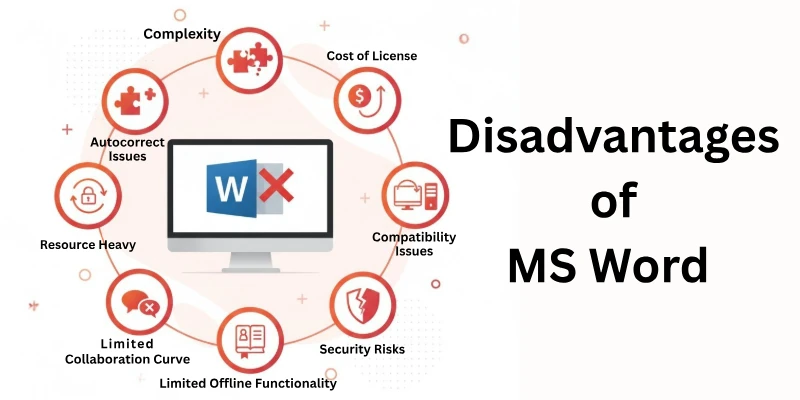
So, here is the list of all the cons of Microsoft word:
- Cost
- Complexity
- Compatibility Issues
- Limited Real-Time Collaboration
- Security Risks
- Bloatware
- Autocorrect Issues
- Limited Offline Functionality
Let us cover all these limitations of Microsoft Word in detail.
1. Cost
This means you have to pay money to get something. Microsoft Word isn’t free; you have to buy it or pay for a subscription to use it. If you don’t want to spend money, you might have to look for a different program.
2. Complexity
This word talks about how something is difficult or hard to understand. Microsoft Word can be complicated for some people because it has a lot of features and buttons. Sometimes it takes time to learn how to use everything.
3. Compatibility Issues
This means that Microsoft Word might not work well with other programs or files. Sometimes, if you make a document in Word and try to open it in a different program, it might look weird or not work correctly.
4. Limited Real-Time Collaboration
Real-time collaboration means working together on something at the same time. In Microsoft Word, it’s not as easy for multiple people to work on the same document together at the exact same time. You might have to wait for others to finish before you can work on it.
5. Security Risks
This talks about dangers or problems with keeping your information safe. Sometimes, files made in Microsoft Word can get viruses or be accessed by people who shouldn’t see them. It’s important to be careful with what you do in Word to protect your information.
6. Bloatware
Bloatware means there are too many things in a program that you might not need or want. Microsoft Word comes with a lot of extra stuff like templates and features that not everyone uses. This can make the program slower or take up more space on your computer.
7. Autocorrect Issues
Autocorrect is when a program tries to fix your spelling mistakes automatically. Sometimes, Microsoft Word can make mistakes and change words to something you didn’t mean. This can be frustrating, especially if it happens a lot.
8. Limited Offline Functionality
Offline means you’re not connected to the internet. Microsoft Word works best when you’re online, but if you don’t have internet access, some features might not work or you might not be able to use it at all. It’s important to know this if you need to work without the internet.
Microsoft Word Alternatives
Here are free and paid software you can enjoy instead of Microsoft Office.
Free Word Alternatives:
- Google Docs
- LibreOffice Writer
- Apache OpenOffice Writer
- WPS Office Writer (Free version)
- Zoho Writer (Free version)
- Dropbox Paper
- TextEdit (Mac)
- WordPad (Windows)
- AbiWord
- Jarte
Paid Word Alternatives:
- Microsoft Word (Microsoft 365)
- WPS Office Writer (Paid version)
- Zoho Writer (Paid plans)
- Scrivener
- Ulysses
- Autodesk Vellum
- Corel WordPerfect
- Mac Pages (iWork suite)
Conclusion
In this article, we have covered all the pros and cons of Microsoft Word in detail. We have seen how MS Word helps us organize our content. Along with that, we have also observed that like any other software, Word also has its limitations. Furthermore, we have explored which other writing software options are available besides MS Word.
So guys go and start exploring!!
FAQs
Here are some of the most commonly asked questions related to the advantages and disadvantages of microsoft word:
Microsoft Word Advantages:
- Easy to use
- Creates professional documents (fonts, layouts)
- Spell and grammar check
Microsoft Word Disadvantage:
- Can be expensive
- Requires a computer
- Some features have a learning curve
Microsoft Office Advantages: Includes Word, Excel, PowerPoint – all essential productivity tools.
Microsoft Office Disadvantage: Suite can be expensive, some features may not be needed by everyone.
Word Processing vs. MS Word: Word processing is the general term for creating and editing documents. MS Word is a specific word processing software program.
Word Processing Disadvantages:
- Requires a computer
- Can over-reliance on spell check
- May slow down quick note taking compared to pen and paper
There are many versions of Microsoft Word, but if you only count major releases, there are over 15. This includes versions from the 1980s all the way up to the current version included with Office 365.






- Be Respectful
- Stay Relevant
- Stay Positive
- True Feedback
- Encourage Discussion
- Avoid Spamming
- No Fake News
- Don't Copy-Paste
- No Personal Attacks
- Be Respectful
- Stay Relevant
- Stay Positive
- True Feedback
- Encourage Discussion
- Avoid Spamming
- No Fake News
- Don't Copy-Paste
- No Personal Attacks
