Pros and Cons of Google: Are You Informed?
Published: 13 Jan 2026
The person who has come to read my article must be familiar with Google. Google is a powerful and the most popular search engine, where we input queries and it provides us with answers.
While commonly referred to as a search engine, it is more suitably described as an answer engine because it comprehensively understands the user’s questions and provides answers.
But does it always provide accurate answers? Can individuals like you and me easily rely on the content uploaded on it? So, to understand these aspects let’s explore the advantages and disadvantages of Google in detail.
Advantages of Google
So, guys, let’s first understand why Google stands out and why we’re so obsessed with it compared to other search engines.
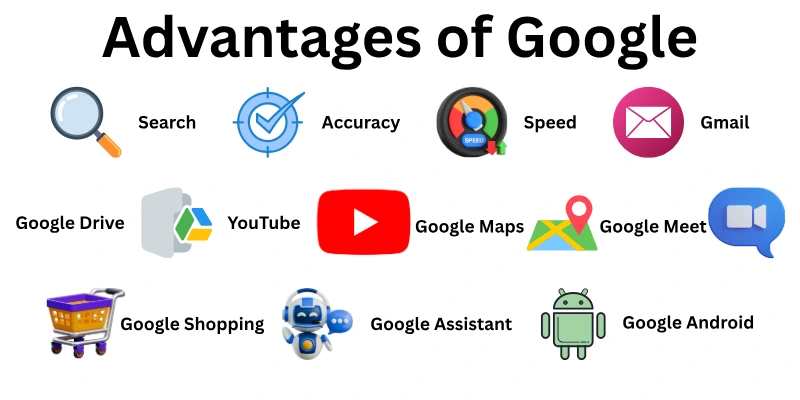
I’ve come up with a list of Google advantages that we’ll cover in detail.
- Search
- Accuracy
- Speed
- User-friendliness
- Advanced Search Options
- Free Services
- Gmail
- Google Drive
- Google Docs, Sheets & Slides
- Google Calendar
- YouTube
- Google Maps
- Google Translate
- Google Chrome
- Google Photos
- Google Android
- Google Play Store
- Google Assistant
- Google Meet
- Google Scholar
- Google Shopping
- Constant Innovation
Let us learn all the benefits of Google in detail.
1. Search
Google Search is the most important part of using Google. Access to a huge amount of information on the internet is made possible by it. You can look into a lot of different subjects with just a few keywords, from current events to historical information, from scientific discoveries to useful how-to guides.
2. Accuracy
Accurate results are an important part of a good search engine. Google makes it a priority to offer trustworthy information. Its algorithms rank search results based on things like the authority of the website, the quality of the content, and how engaged users are with it.
3. Speed
Time is very valuable. Google is great at quickly finding information. It can give you millions of search results in a very short amount of time thanks to its fast and smart algorithms. You can find what you need right away.
4. User-friendliness
Google’s user interface is designed with simplicity. It can be used by people of all ages and levels of technical knowledge because it has a clean style and is easy to navigate. Anyone can easily find their way around and find the information they’re looking for.
5. Advanced Search Options
Google has many advanced search options for people who want to find deeper details. You can narrow down your finds by using filters like a date range, a file type, or certain keywords. With this level of control, you can dig deeper into a subject and find the exact data you need.
6. Free Services
The large number of free services and apps that Google offers is a big plus. For both personal and business needs, Google has a wide range of tools available. Because of this, these features can be used by more people without having to buy expensive software.
7. Gmail
Google gives Gmail, a free email service with a lot of storage space, for people who need to communicate virtually. It says it has strong search tools, filters out spam, and is easy to connect to other Google services. In this way, it is a safe and useful way to handle your email communications.
8. Google Drive
Cloud storage is getting more and more important. You can store your documents, photos, videos, and other things online for free with Google Drive. This lets you view your data from any device with an internet connection and protects it in case your device fails.
9. Google Docs, Sheets & Slides
Google has a free online productivity bundle that can be used instead of expensive software packages. Google Docs lets people work together on word processing, Sheets lets you make spreadsheets, and Slides makes it easy to give slideshows. These tools make it easy to share documents and work together in real time.
10. Google Calendar
It is very important to keep track of meetings and due dates. There is a free online calendar tool called Google Calendar that works well with other Google services. On an easy-to-use app, you can add events to your calendar, set reminders, and share it with other people.
11. YouTube
YouTube is the most popular video-sharing site in the world. It is owned by Google and lets people watch and share videos for free. You can watch a huge collection of content made by other users. And, can also make your own channel and earn through it.
12. Google Maps
Because Google Maps came out, you will never get lost again. This online mapping service is free and gives drivers, cyclists, and walkers detailed maps and directions. Now you can easily plan your trips, visit new places, and find businesses close by.
13. Google Translate
A free translation tool that works with a huge number of languages is available on Google Translate. Assist people who don’t speak the same language to communicate and understand each other by translating text, websites, and even spoken talks in real time.
14. Google Chrome
For a smooth and secure web browsing experience, Google Chrome stands out as a free and popular web browser. Its fast performance, user-friendly interface, and extensive library of extensions make it a favorite choice for many users.
15. Google Photos
In today’s digital age, managing photos can be a challenge. Google Photos offers a free online photo storage and management solution. Store your photos securely in the cloud, organize them with ease using intelligent search and categorization features. And you can access your images whenever you want.
16. Google Android
Google’s Android operating system is a free and open-source platform for smartphones and computers that runs on billions of phones around the world. It is a major player in the mobile world thanks to its easy-to-use interface, large community of apps, and constant improvements.
17. Google Play Store
Google Play Store is the main app store for Android devices. It’s a place where you can download apps and games and manage them. You can choose from a huge number of free and paid choices, get suggestions for new favourites, and easily keep your apps up to date.
18. Google Assistant
Google Assistant is a free virtual assistant that you can use by speaking to it. It makes life easier and more handy. You can use your voice to get answers, handle smart home devices, keep track of your schedule, and do other things without using your hands.
19. Google Meet
Google Meet is a free and easy-to-use tool for videoconferencing in today’s collaborative workplace. Hold online meetings, connect with clients and coworkers from afar, and encourage good communication no matter where you are.
20. Google Scholar
Google Scholar is a search engine that is specifically designed for academic study and research. You can read a huge number of academic papers, articles, books, and other scholarly works. Researchers can use this targeted search tool to find academic sources that are both useful and reliable.
21. Google Shopping
It can be hard to find your way around the huge world of online shopping. Google Shopping is a free tool that lets you compare products. You can easily find deals and discounts,
compare prices from different stores, and make smart buying choices all in one place.Constant Innovation
An important thing about Google is that it is always coming up with new ideas. New products and services are always being made by the company to meet the changing wants of its customers. Google stays at the cutting edge of technology by committing to progress.
Disadvantages of Google
By now you guys have probably figured out the benefits of Google, but there’s still a question popping in our minds: are there only pros to Google? Are there no cons?

So, to find out, I’ve compiled a list of drawbacks of Google for you below.
- Privacy Concerns
- Search Bias
- Limited Control Over Data
- Antitrust Concerns
- Reliance on Advertising
- Battery and Resource Drain
- Incognito Mode Misconceptions
- Vulnerability to Hacks
Let us cover all the cons of Google in detail.
1. Privacy Concerns
A big problem with Google is that it gathers a lot of information about its users. Google collects information from Google services, search queries, browsing habits, and locations. Although users can change their privacy settings, the amount of data being collected makes people worry about their privacy and the possible misuse of data.
2. Search Bias
The search engines at Google try to give you the best results. But there’s a chance that search bias will change the results you see. This bias can come from where you are, what you’ve searched for in the past, or even Google’s own business goals. In some cases, this could mean that users get an inaccurate perspective or miss out on important information.
3. Limited Control Over Data
When you give Google your information, it can be hard to get back control of it. Users may not fully understand how their data is used or shared with third parties, even though Google gives users some ways to manage and delete data. So, the users who care about data privacy may not like not being able to control this.y.
4. Antitrust Concerns
Concerns about unfair competition are raised by Google’s huge number of services and its strong place as the leading search engine. Others say that Google’s power makes it hard for other companies to compete and customers to choose.
5. Reliance on Advertising
Many of Google’s profits come from ads. Users benefit from this free model because they get free services, but it can also make businesses rely too much on advertising income. Google may put features that bring in ad revenue ahead of features that only help users because of this dependency.
6. Battery and Resource Drain
A lot of resources may be needed for some Google services, like Google Chrome. This can cause older computers and mobile devices to use more battery life and run less quickly. Even though improvements are made, this could be bad for people who don’t have a lot of resources.
7. Incognito Mode Misconceptions
A lot of users think that Incognito Mode gives them full privacy while they browse. But the main way it works is by stopping the device’s browsing data from being saved there. Google, your internet service provider, or the websites you visit can still keep track of what you do. This false belief can give people a false sense of security and put their privacy at risk.
8. Vulnerability to Hacks
Even though Google has security steps in place, hackers can still get into their services. If the hacker is successful, they could get access to user data, stop services, or even spread false information. This flaw shows how important it is for both Google and its users to have strong security measures in place.
Conclusion
In this article we have covered all the pros and cons of Google search engine. We’ve explored how Google search benefits us and how we can utilize its features to make our searches more accurate and convenient.
Then, we’ve examined some of the drawbacks of Google search that often lead people, like you and me, to prefer alternative search engines.
However, it’s important to remember that Google is constantly updating itself, making it the leading search engine in terms of innovation and adaptability. While it does have its limitations, Google’s pros ultimately outweigh its cons.
FAQs
Here are some of the most commonly asked questions related to the advantages and disadvantages of Google search engine:
No, there are other search engines available, such as DuckDuckGo, Bing, and Yahoo. However, Google is by far the most popular search engine globally.
While you can’t completely prevent Google from collecting some data, you can adjust your privacy settings to limit the information collected and control how it’s used.
Yes, several productivity suites offer similar functionalities, such as Microsoft 365 and LibreOffice. There are also alternative email services like ProtonMail and Zoho Mail.
While Chrome is popular, other secure browsers exist, like Firefox and Safari. Choosing the best browser depends on your individual needs and priorities.
- Regularly review and adjust your privacy settings.
- Utilize Incognito Mode with caution, understanding its limitations.
- Consider using privacy-focused extensions for your browser.
- Be mindful of the information you share on Google services.
Google Assistant can be activated by voice commands, but it typically requires a wake word like “Hey Google” or “Ok Google” to be triggered. Google is not constantly listening through your phone’s microphone.
Yes, Google Maps allows you to download offline maps for specific areas, enabling navigation even without an internet connection.
Currently, Google Drive offers 15GB of free storage, shared across your Gmail, Drive, and Photos.
Google Scholar itself is free to use. However, some of the academic resources it links to might require a paid subscription or library access.
- Close unused Google apps and tabs.
- Limit background refresh for Google apps.
- Adjust location services settings for Google apps.
- Consider alternative browsers that might be more battery-efficient.





- Be Respectful
- Stay Relevant
- Stay Positive
- True Feedback
- Encourage Discussion
- Avoid Spamming
- No Fake News
- Don't Copy-Paste
- No Personal Attacks
- Be Respectful
- Stay Relevant
- Stay Positive
- True Feedback
- Encourage Discussion
- Avoid Spamming
- No Fake News
- Don't Copy-Paste
- No Personal Attacks
