Pros and Cons of Google Maps: Navigate Smart or Not?
Published: 4 Jan 2026
Google Maps is used by billions of people around the world to find their way every day. But have you ever thought about the app’s pros and cons?
So guys, in this blog post, we’ll dive into the advantages and disadvantages of Google Maps, providing a comprehensive overview of this widely used tool.
Advantages of Google Maps
Google Maps offers a variety of features that make it a powerful and convenient tool for navigation and exploration.
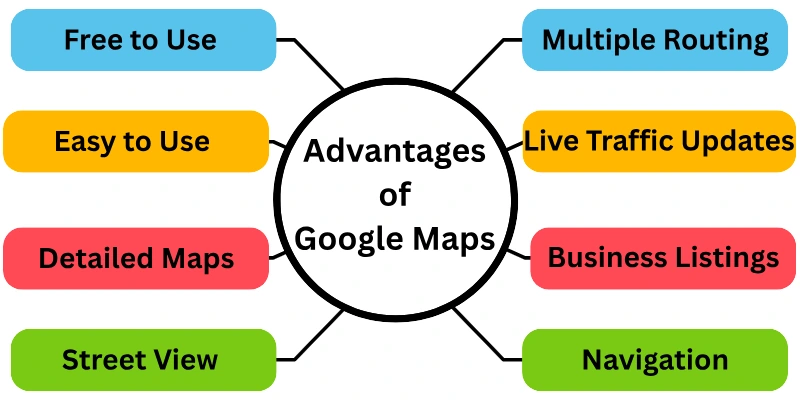
Here’s a breakdown of key benefits of Google Maps:
- Free to Use
- Easy to Use
- Detailed Maps
- Turn-by-Turn Navigation
- Multiple Routing Options
- Live Traffic Updates
- Street View
- Business Listings and Reviews.
- Offline Maps.
- Integration with Other Google Services
Let us cover all these above-mentioned pros of google maps in detail.
1. Free to Use
One of Google Maps’ most significant advantages is that it’s completely free. While some navigation apps require paid subscriptions or in-app payments to fully function, Google Maps does not. That’s why anyone can use it for free without any problems.
2. Easy to Use
Google Maps is made to be easy for people to use. The layout is organized and straightforward to use, with labels and icons that are easy to see. The app is easy to use, even for people unfamiliar with technology. It is easy to look for places, and features like drag-and-drop moving and zooming make it simple to get around.
3. Detailed Maps
Google Maps has a huge collection of maps that is always being updated. It covers a huge part of the world and gives you accurate street maps, satellite images, and in some places even views of the surroundings. This level of detail lets you know exactly where you are, virtually visit places you haven’t been before, and confidently plan your routes.
4. Turn-by-Turn Navigation
You’ll never get lost again thanks to Google Maps’ turn-by-turn guidance. After you type in your location, Google Maps will talk to you clearly and in real time as you travel. Also on the map are expected arrival times and visual directions for how to get from one place to another. This function is especially helpful when driving in unfamiliar areas.
5. Multiple Routing Options
Google Maps is more than just a mapping app for cars. It gives you a choice of routes so you can get where you want to go however you want. You can choose to drive, ride a bike, walk, or even take the bus. You can determine the best route for your needs by looking at each choice’s estimated journey times and distances.
6. Live Traffic Updates
You can avoid traffic jams and save time with live traffic updates on Google Maps. This feature shows present traffic conditions, such as accidents, road closures, and congestion levels, in real-time. Google Maps can use this information to suggest other routes that will help you get to your location faster. Live traffic updates are very helpful for people who drive to work or travel in busy places.
7. Street View
Google Maps’ Street View tool lets you see where you’re going before you even get there. This cool new feature gives you panoramic, 360-degree street-level images that let you virtually walk around an area and get a feel for it. You can use Street View to see your way, look at possible restaurants or shops, and even find landmarks.
8. Business Listings and Reviews
Google Maps has a huge database of business listings that make it easier than ever to find the right places. If you search for a restaurant, store, or any other interesting place, Google Maps will show you where it is, how to get there, pictures, and even reviews from other users. By reading reviews from other customers, you can make smart choices about where to eat, shop, or visit.
9. Offline Maps
Downloading maps for certain places lets you use Google Maps even when you’re not online. This function is very helpful when exploring new places, going abroad, or just wanting peace of mind. Downloaded maps work just like regular Google Maps to find places, get directions, and get around.
10. Integration with Other Google Services
You can connect Google Maps to other Google services, making planning trips and finding your way around even easier. You can look for a place on Google Search, for example, and then quickly send directions to your phone using Google Maps. Furthermore, Google Assistant can access your Google Maps information to let you use voice commands for navigation while you’re moving.
Disadvantages of Google Maps
While Google Maps offers a wealth of advantages, it’s not without its limitations.
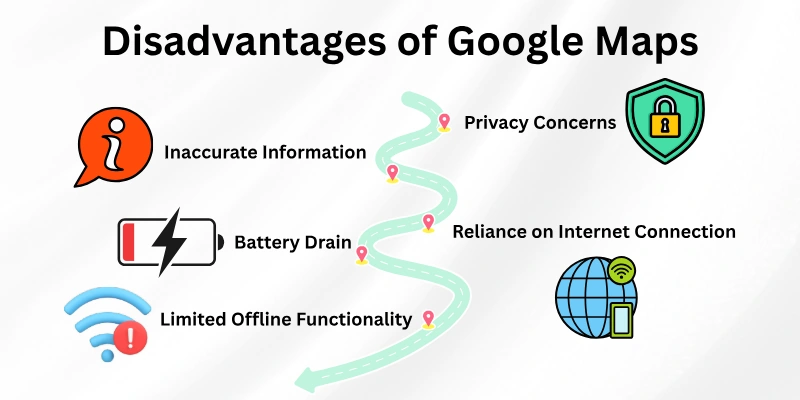
Here’s a quick rundown of some of the key drawbacks to consider:
- Privacy Concerns
- Reliance on Internet Connection
- Inaccurate or Outdated Information
- Limited Offline Functionality
- Battery Drain
Let us cover all the cons of google maps in detail.
1. Privacy Concerns
One of the main problems with Google Maps is that it could negatively impact people’s privacy. As you use the app, it records your location, which could be used for focused ads or to make you worry about personal data tracking. Even though Google has privacy settings that let users limit the amount of data they share, some users may still not feel okay with how much data is being shared.
2. Reliance on Internet Connection
For Google Maps to work at its best, it needs to be connected to the internet. You need to be connected to the internet to use features like live location sharing, real-time traffic reports, and turn-by-turn navigation with voice guidance. This can be a problem in places where internet access is slow or nonexistent, making the app less useful in those places.
3. Inaccurate or Outdated Information
Despite Google’s efforts to preserve accuracy, there is always the possibility of finding outdated or incorrect data on Google Maps. This could be due to delays in updating company listings, changes in road closures that have not yet been updated, or user-submitted data that contains mistakes.
4. Limited Offline Functionality
Some features of Google Maps’ offline map download feature are limited. Users need tools like real-time traffic updates and voice-guided turn-by-turn navigation that aren’t available on downloaded maps. More than that, downloading large maps can take up a lot of space on your device.
5. Battery Drain
Google Maps consume your battery quickly, especially when you use features like live traffic reports and GPS navigation. Your device’s battery dies faster because it is constantly tracking your location and processing data. If you’re worried about battery life, especially on long trips, you might want to look into other ways to find your way or use tools in the app that save battery life.
Conclusion
In this article we have covered all the advantages and disadvantages of google maps in detail. Although Google Maps is a powerful tool with a lot to offer, but it’s not perfect. And If you want to know if this is the right mapping app for you, you can compare its above mentioned pros and cons. The pros include its free, easy-to-use design, detailed maps, and privacy concerns. The cons include limited offline functionality and privacy concerns.
Expert Tip:
- If privacy is a major concern, explore adjusting your Google Maps settings to limit data collection.
- For short trips in familiar areas, consider downloading offline maps beforehand to save battery and avoid relying on an internet connection.
- Even though Google Maps is a useful tool, you can improve your travel experience by using it wisely and knowing its limits.
FAQs
Here are some of the most commonly asked questions related to the pros and cons of google maps:
Google Maps is a free digital map that helps you navigate the world around you. It provides features like:
- Finding locations and getting directions (driving, walking, cycling, public transport)
- Exploring places with Street View panoramas
- Discovering businesses with reviews and photos
- Using maps offline (downloaded areas)
Satellite images, user-generated data, and real-time data are all used by Google Maps to make a complete picture of the world. It uses the GPS on your phone to figure out where you are and show you the way.
Here is the list of all major boon of Google map:
- Easy-to-use navigation
- Explore new places
- Save time and money
- Stay informed
Google Maps is a popular choice due to its:
- Free and user-friendly interface
- Extensive global coverage
- Wide range of features (navigation, Street View, business listings, offline maps)
- Integration with other Google services (Search, Assistant)
Businesses can use Google Maps data to:
- Understand customer demographics and behavior near their locations
- Optimize delivery routes and logistics
- Improve marketing campaigns by targeting specific areas





- Be Respectful
- Stay Relevant
- Stay Positive
- True Feedback
- Encourage Discussion
- Avoid Spamming
- No Fake News
- Don't Copy-Paste
- No Personal Attacks
- Be Respectful
- Stay Relevant
- Stay Positive
- True Feedback
- Encourage Discussion
- Avoid Spamming
- No Fake News
- Don't Copy-Paste
- No Personal Attacks
